1.contact the event organizer
TicketGateway is an online, self-service tool. This means that organizers handle all aspects of their events. If you have event-specific questions or want to request a refund, contact the event organizer directly. You can do this by replying to your order confirmation email, referencing your order details, or by sending them a message from the event listing where you originally registered.
- You can visit the event view page where you can find the organizer contact button on the left side of the page.
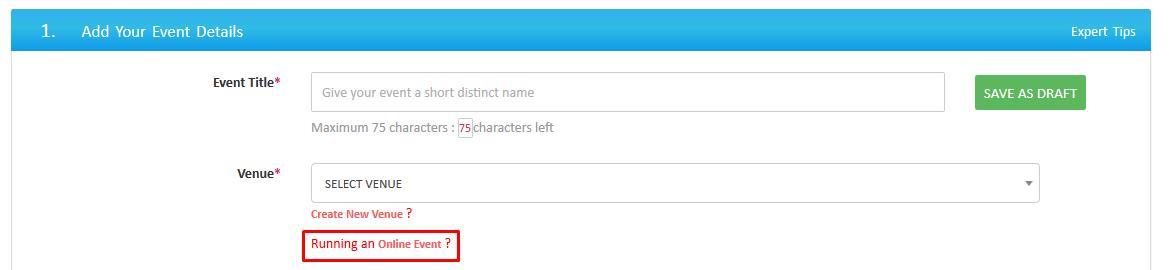
2.set up an online event
While creating an event simply select the "running online event" link just below the select venue box.
3. delete or hide a ticket type
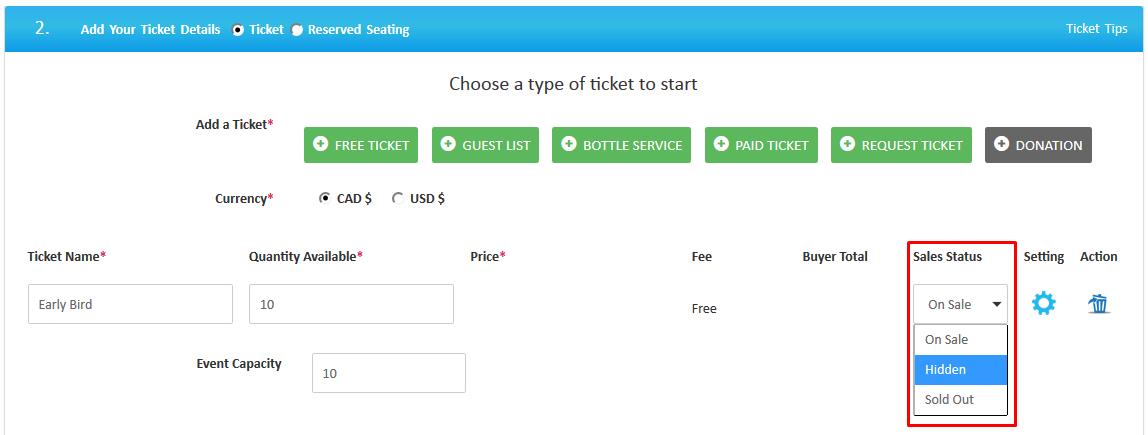
If you want to hide tickets that have been sold or you don't want to show sold tickets publicly, you can hide those tickets by following the steps below.
Visit "My Store" in your account. Choose which event you want to edit - you can find the edit option under the quick links section. Scroll down and select edit your ticket details. Here find sale status drop down, simply click that and select the "Hidden" option and that ticket will be hidden in your live event.